

Introduction
Cloud technology has changed how businesses set up, run, and grow their IT infrastructure. Virtualization in cloud computing is a strong technology that makes it possible for several virtual environments to run on a single physical machine. This is at the heart of this change. The cloud ecosystem as we know it now would not exist without virtualization.
In this in-depth study, we’ll look at the ideas behind virtualization, the many forms of virtualization, its design, its pros and cons, and what the future holds for it. This article will help you understand how virtualization makes the cloud work, whether you’re a student, an IT professional, or a business owner.
What is Virtualization?
Virtualization is the process of making a virtual copy of a real resource, like a server, storage device, network, or operating system. Virtualization lets many virtual machines (VMs) share the same hardware resources efficiently, instead of having one real machine do one job.
Virtualization is the process of separating hardware from software. This separation makes better use of resources, more flexibility, and more scalability, all of which are important in cloud systems.
What is the Cloud?
Cloud computing is when you get computing services including servers, storage, databases, networking, software, and analytics over the internet. Cloud providers offer these services on demand, so enterprises don’t have to operate and take care of their own data centers.
Virtualization in cloud computing is a big part of cloud architecture because it lets companies offer services that can grow and are cheap to millions of people across the world.
How Virtualization Works in the Cloud
A hypervisor is a unique piece of software that makes virtualization work. The hypervisor is in charge of allocating resources like CPU, memory, and storage between the actual hardware and the virtual computers.
The Core Engine of Hypervisors
There are two primary kinds of hypervisors:
Type 1 (Bare-Metal Hypervisor)
Put directly on the hardware.
VMware ESXi and Microsoft Hyper-V are two examples.
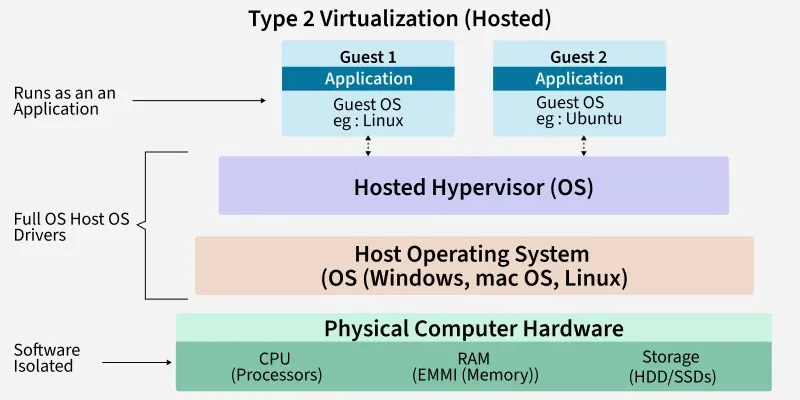
Type 2 (Hypervisor that is hosted)
Put on top of an operating system.
For example, VMware Workstation and VirtualBox.
The hypervisor makes sure that each virtual machine works on its own, even if they all use the same hardware.
Different Kinds of Virtualization in Cloud Computing
In cloud systems, different kinds of virtualization serve distinct functions. Let’s look at the primary types:
1. Virtualization of Servers
Virtualization of a server splits one physical server into several virtual servers. Each virtual server has its own operating system and programs.
2. Virtualization of Storage
Storage virtualization puts together several real storage devices into one virtual storage unit. This makes it easier and more versatile to manage data.
3. Virtualization of Networks
With network virtualization, you may make virtual networks that work without the need for physical network gear. It makes things more flexible and makes managing the network easier.
4. Virtualization of the Desktop
With desktop virtualization, people can access their desktop from anywhere in the world through the cloud. Many companies utilize it for remote work.
5. Virtualization of Applications
This lets apps run on their own, which cuts down on problems with compatibility.
6. Virtualization Based on Containers
Containers use the same operating system as the host, but they keep applications separate in small spaces. This way of doing things became popular thanks to tools like Docker and Kubernetes.
Important Parts of Virtualization Architecture
To get a better idea of what virtualization in cloud computing, it helps to look at its main building blocks:
Computer that Hosts
The hardware that gives you computational power.
Virtual Machines (Guest Machines)
Virtual environments that run on the host system.
Hypervisor
Controls and gives out resources to guest machines.
Network in a Virtual World
Links virtual machines to one other and to the outside world.
Software for Managing
Tools that keep an eye on, automate, and manage virtual spaces.
Table: Comparing Physical and Virtualized Infrastructure
| Feature | Physical Infrastructure | Infrastructure that is Virtualized |
|---|---|---|
| Use of Resources | Not very efficient | High efficiency |
| Scalability | Limited | Very scalable |
| Cost | Costly hardware | Lower cost of hardware |
| Deployment Speed | Slow | Fast |
| Disaster Recovery | Hard to understand | Easy to understand |
| Flexibility | Limited | Very adaptable |
Advantages of Virtualization in Cloud Computing
There are many reasons why virtualization in cloud computing is so prevalent in cloud computing:
1. Better Use of Resources
Virtualization makes ensuring that hardware resources are used well, which cuts down on waste.
2. Saving Money
Businesses save money by using less physical hardware and less energy.
3. Ability to Grow and Change
You can change the amount of resources you use based on how much you need.
4. Faster Deployment
You can make and use virtual machines in only a few minutes.
5. Better Recovery from Disasters
You can easily back up and restore virtual computers.
6. Safety and Isolation
Each virtual computer works on its own, which makes it easier to find and fix problems.
Example: How to Make a Virtual Machine (Conceptual CLI)
Here’s a simple example of how to use a command-line interface to make a virtual machine:
# Create a new virtual machine
vmcreate –name “TestVM” \
–cpu 2 \
–memory 4GB \
–disk 50GB \
–os “Ubuntu 22.04”
# Start the virtual computer
vmstart –name “TestVM”
This excerpt shows how rapidly virtual instances may be set up in cloud environments.
In the Real World
Virtualization is very important for:
-
Platforms for the public cloud
-
Data centers for businesses
-
Environments for testing software
-
Pipelines for DevOps
-
VDI stands for Virtual Desktop Infrastructure
-
Systems for recovering from disasters
Cloud computing wouldn’t be possible without virtualization. Without it, these services would need a lot of physical equipment.
Problems with Virtualization
There are certain problems with virtualization, even though it has some benefits:
1. Performance Overhead
Running more than one virtual machine on the same host can hurt performance.
2. Risks to Security
If the hypervisor is hacked, all of the VMs it hosts could be in danger.
3. Complicated Management
It takes competent people to run massive virtual environments.
4. Problems with Licensing
In virtualized environments, some software licenses are hard to understand.
Containerization vs. Virtualization
Both methods are related, however they are very different:
| Feature | Virtual Machines | Containers |
|---|---|---|
| OS Requirement | Different OS for each VM | Shared OS |
| Resource Use | Higher | Lower |
| Boot Time | Minutes | Seconds |
| Isolation | Strong | Moderate |
| Best Use Case | Full OS environments | Microservices |
Containerization is seen as an improvement over virtualization, although it doesn’t completely replace it.
What Will Happen with Virtualization in the Future
The future of virtualization in cloud computing includes:
-
Working with management tools that use AI
-
Deployments of edge computing
-
Growth of hybrid clouds
-
Models for serverless computing
-
Better security frameworks
Virtualization technology keeps becoming better as more people use the cloud.
Frequently Asked Questions
What does virtualization mean in plain English?
Virtualization is the process of making virtual copies of physical computing resources to make them more efficient and flexible.
What makes virtualization crucial in cloud computing?
It makes it possible to share resources, grow, save money, and deploy faster.
Is virtualization safe?
Yes, virtualization offers robust isolation and security capabilities when deployed correctly.
Conclusion
Virtualization in cloud computing is not simply a supporting technology in today’s digital world; it is the main part of current cloud infrastructure. It helps businesses make the most of their resources, cut expenses, make their systems more scalable, and improve their ability to recover from disasters.
Virtualization has come a long way, from server virtualization to containers, and it still affects how cloud services are delivered. Companies who use virtualization well have an edge over their competitors in terms of flexibility, innovation, and operational efficiency.
As cloud computing gets better, virtualization will continue to be a key part of digital transformation, making IT systems that are scalable, safe, and cheap for the future.